Home LogIQ VDA5050

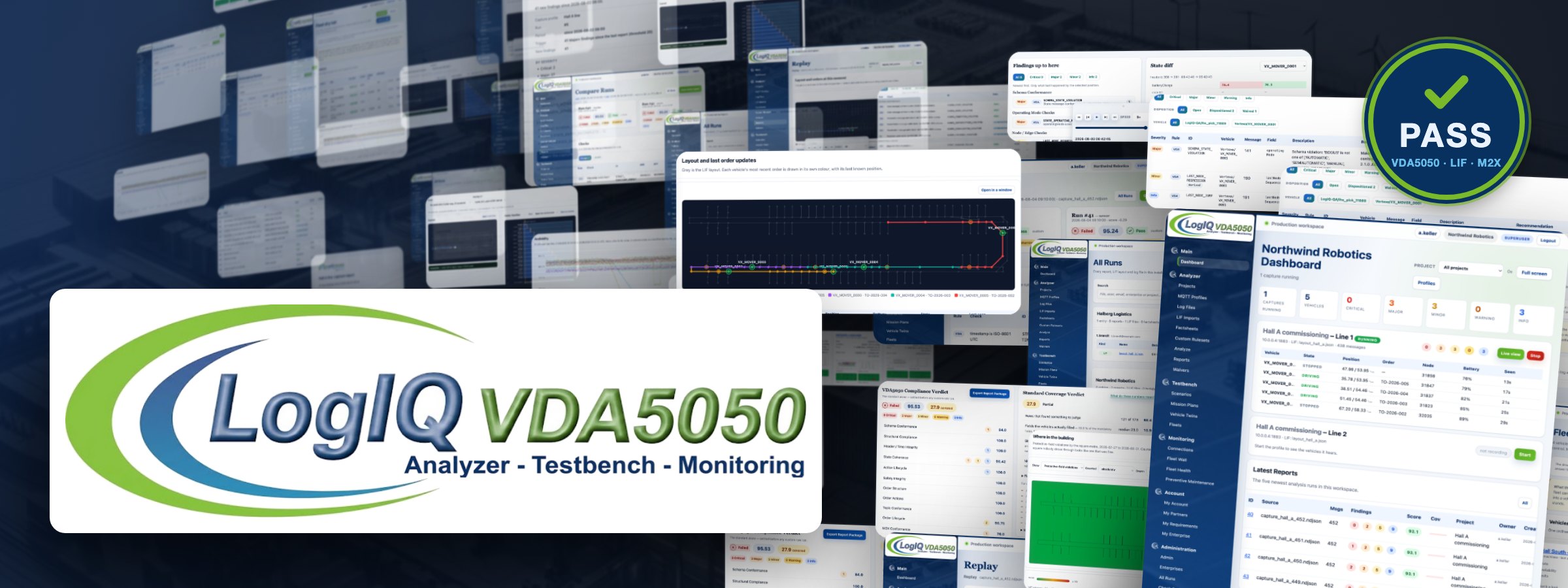
LogIQ VDA5050 logo above a LIF-style track network, the application's dashboard in a browser frame with a PASS verdict card and the signed-package line in front of it, and the wordmark beneath it: Analyzer - Testbench - Monitoring.
A LogistiXpert product

Bringing the VDA5050 Community together.

One platform for the three parties of a VDA5050 project: prepare an onboarding with published requirements, repeat the same test on the bench until it passes and diagnose a fault in operation from the recorded messages. Everyone works from the same recordings, checks and reports.

An independent tool. It reads VDA 5050, VDMA LIF and VDMA M2X and reports what deviates from them. It issues no certification and no release approval. Neither the VDA nor the VDMA is affiliated with it, endorses it or has reviewed the checks it applies. More in the imprint.

1 · Platform

The interface is in the standard. Its interpretation is not.

Vehicle and fleet controller usually come from different companies. VDA5050 describes the messages. It does not show whether both sides read them the same way. LogIQ VDA5050 connects three stages that are normally handled with separate tools: preparing an onboarding, testing reproducibly and diagnosing a fault in operation.

Fleet-controller vendors

Situation
Every new vehicle type raises the same questions about actions, parameters and timing. They are answered again on each call and on each site visit.
Workflow
The vendor writes its requirements into a requirement file once and publishes it to approved partners. Manufacturers measure their recordings against it and share the report back.
Result
A report per vehicle type that names what is fulfilled and what is still missing, before anyone travels.

Vehicle manufacturers

Situation
Each fleet controller expects slightly different behaviour. Deviations tend to surface during commissioning, on the customer's site.
Workflow
The manufacturer records its vehicle on its own bench or drives a planned test run against it and checks the traffic against VDA5050 and against the published requirements, as often as needed.
Result
A list of named deviations with the message and field behind each one and a report package to pass on.

Fleet operators

Situation
A mixed fleet runs every day. When something goes wrong, the vendors involved present competing explanations.
Workflow
A connector records the site's traffic permanently and checks it. Digests and alerts report deviations. Replay shows what each vehicle reported and what it was ordered to do.
Result
Recorded messages for each incident and operating figures per vehicle over months.
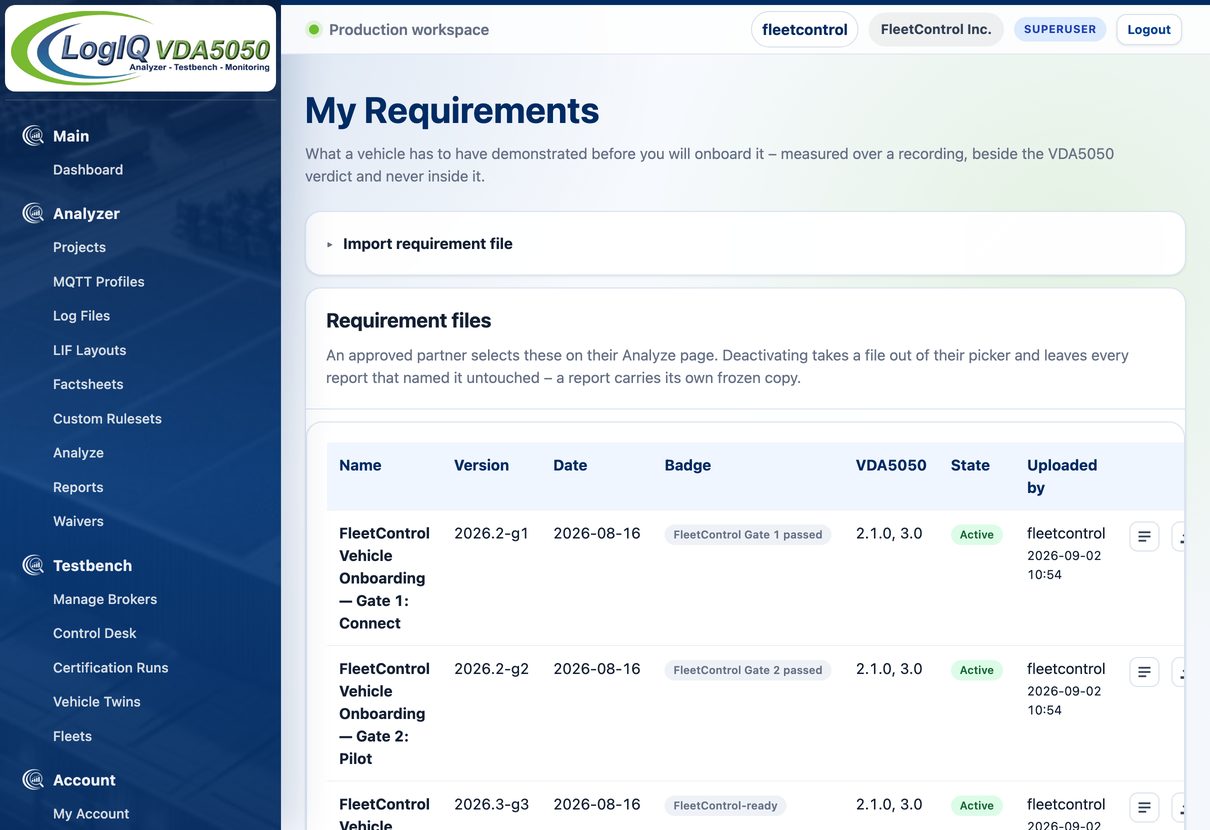
The My Requirements page of a fleet-controller vendor: three requirement files for vehicle onboarding, each with version, date, the badge it awards, the VDA5050 versions it applies to and its state.
Requirement files of a fleet-controller vendor (demo data). Each one names the badge the vendor awards for it.

How companies share requirements and evidence

The fleet-controller vendor uploads its requirements as a file: which checks must pass, how much coverage a run needs and which actions a vehicle has to declare. An approved partner selects that file on its Analyze page. LogIQ measures the partner's recording against it beside the VDA5050 verdict and never inside it.

The manufacturer receives a line-by-line list of what is missing and can share the report with the vendor. The vendor reads the same report and decides whether the vehicle is ready for a site. A report carries the vendor's badge only after the vendor has approved the partnership.

What a badge means. The badge is the vendor's own acceptance mark, named and issued by that vendor. It is not a certification and not an approval by the VDA or the VDMA.

2 · Analyzer

One tool, three specifications

The Analyzer reads recorded or live traffic and checks every message against the specification version it claims. The result is a report that states what passed, what failed and what could not be judged.

234checks

VDA5050

1.1, 2.0.0, 2.1.0 and 3.0

Schema, protocol header, order and state structure, node, edge and action lifecycles, order-state correlation, battery and safety fields, orders against the layout.

16checks

M2X

0.9.0 · preview

Peripheral interfaces: load handling, doors, lifts, signal lights, charging devices and transport orders, against the official schemas.

15checks

VDMA LIF

1.0.0 · 2.0.0 preview

Layout files: schema, node and edge integrity, reachability across the graph and station references. Layouts in the coming LIF 2.0.0 are read as a preview.

Preview. M2X and LIF 2.0.0 are not final. Their results are marked as a preview and must not be used as the basis of a formal conformance statement. VDA5050 and LIF 1.0.0 results are unaffected.

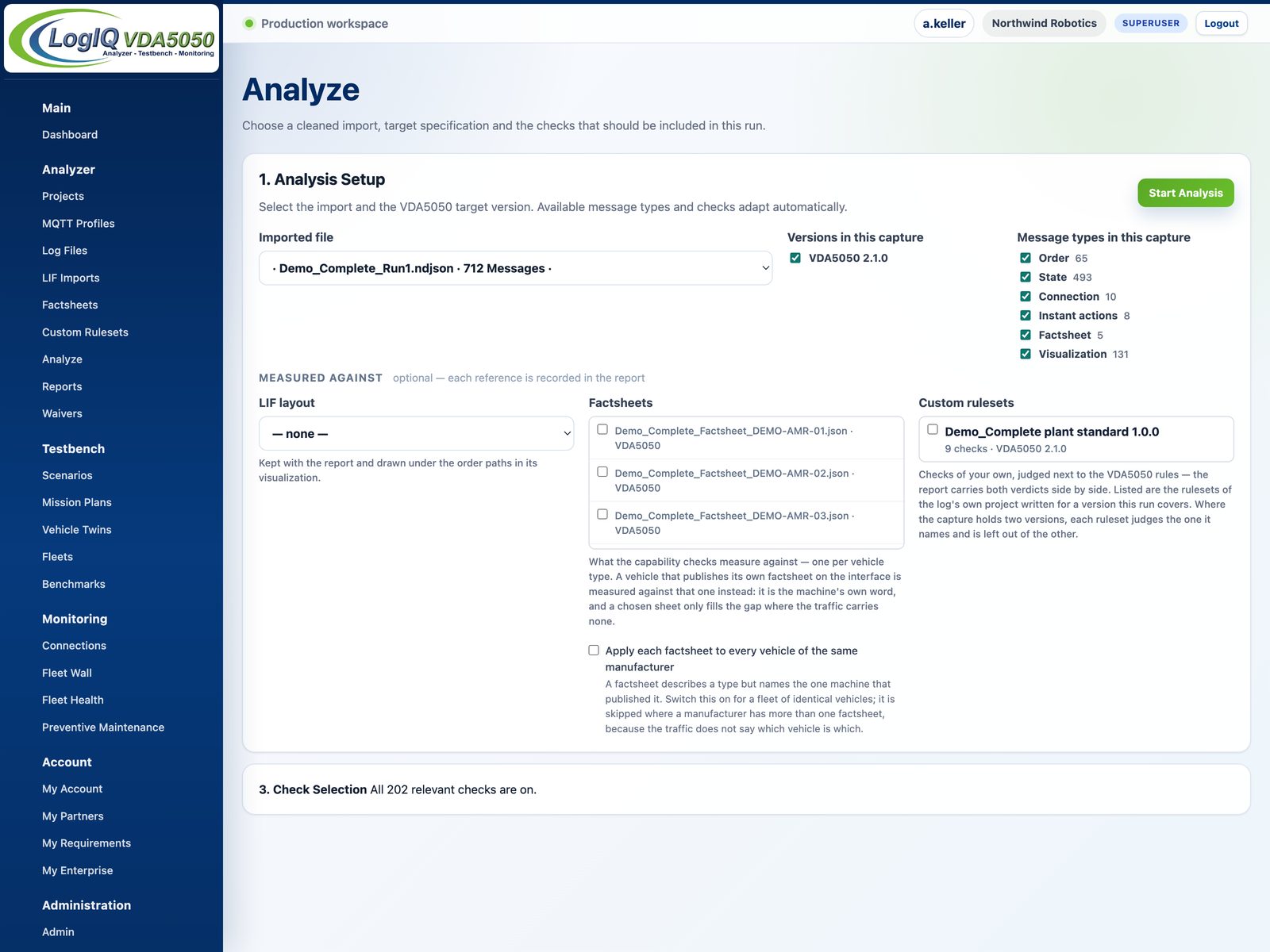
The Analyze page: the versions a capture holds and the message types it holds, each ticked and each with its count. Below them the checks of the version whose tab is open.
The Analyze page offers the versions and message types found in the file, each with its count.

What goes in and what is checked

Input is a log file (.log, .txt, .json, .ndjson) or live MQTT traffic from a capture profile. Several files can be merged into one log in timestamp order. The Analyze page shows every VDA5050 version and message type the traffic contains. You choose which of them are judged.

The checks run in four layers: the official JSON schema of the version, then structure and field types, then sequences such as headerIds, node and edge progress and action lifecycles, then coherence between the order that was sent and the state that came back. Everything is evaluated per vehicle, so ten vehicles do not multiply one vehicle's findings.

Result
A report with a score per check family and every finding tied to its message, field path and specification clause.
Decision
Which deviations have to be fixed and by whom. Where a rule can tell, the finding names the responsible side.
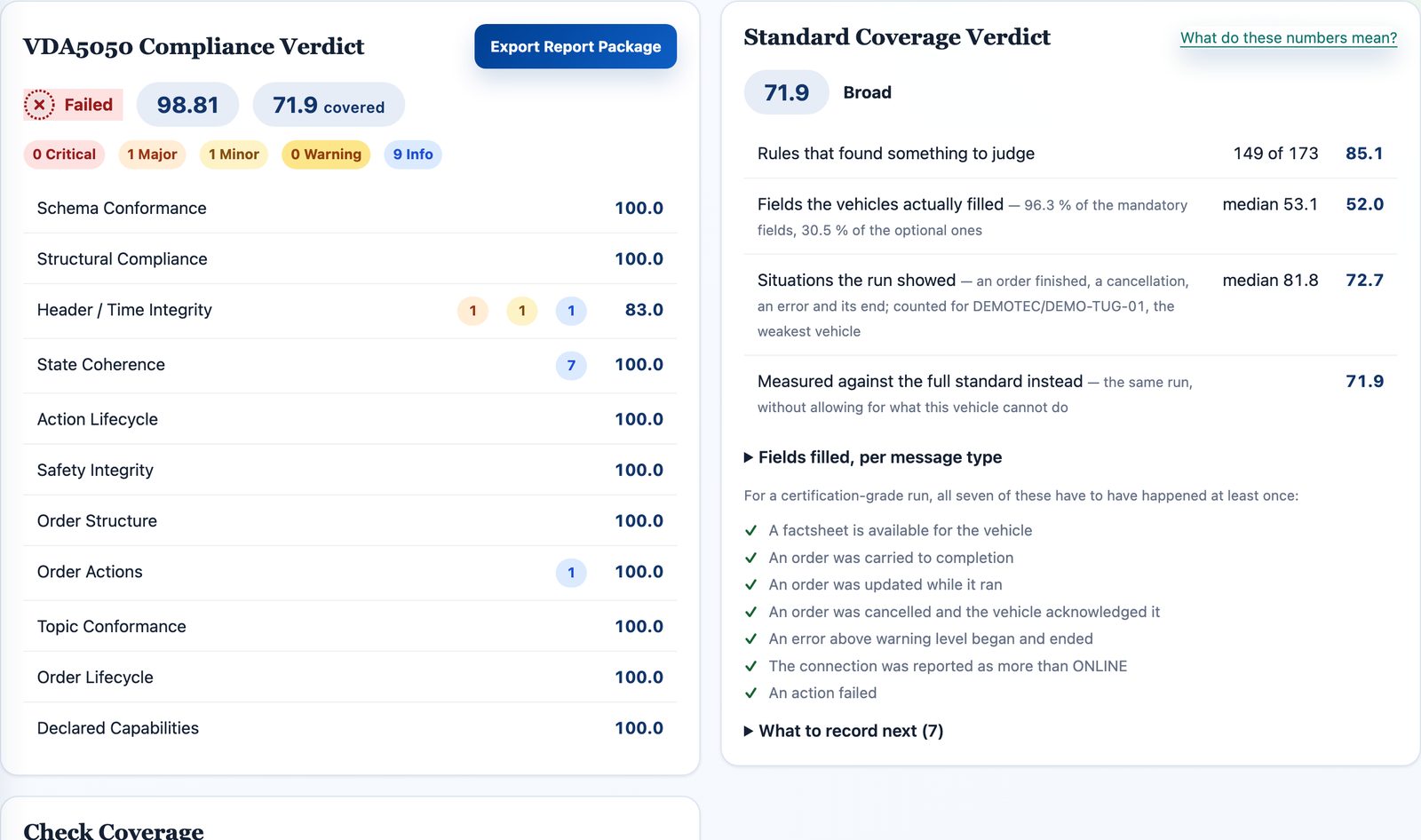
The two verdict cards of a report side by side: the VDA5050 compliance verdict with its score beside the standard coverage verdict with its figures and the seven conditions a complete run has to meet.
Compliance verdict and coverage verdict side by side. Neither figure moves the other.

Two figures: score and coverage

A score says how much of what was tested passed. It does not say how much there was to test. Every run therefore carries a second figure: coverage, the share of the standard the recording actually put to the test. It is measured against what the target version describes, minus what the vehicle's factsheet says it has no hardware for. With several vehicles the figure is the lowest of them, not the average.

Seven conditions must be met for a complete run, for example an order carried to completion, an order updated while running, an order cancelled and acknowledged or an error that began and ended. The report names the ones still missing and what to record to close them.

No silent pass. Every rule is reported as active, no data or switched off. A rule without a situation to judge does not count as passed.

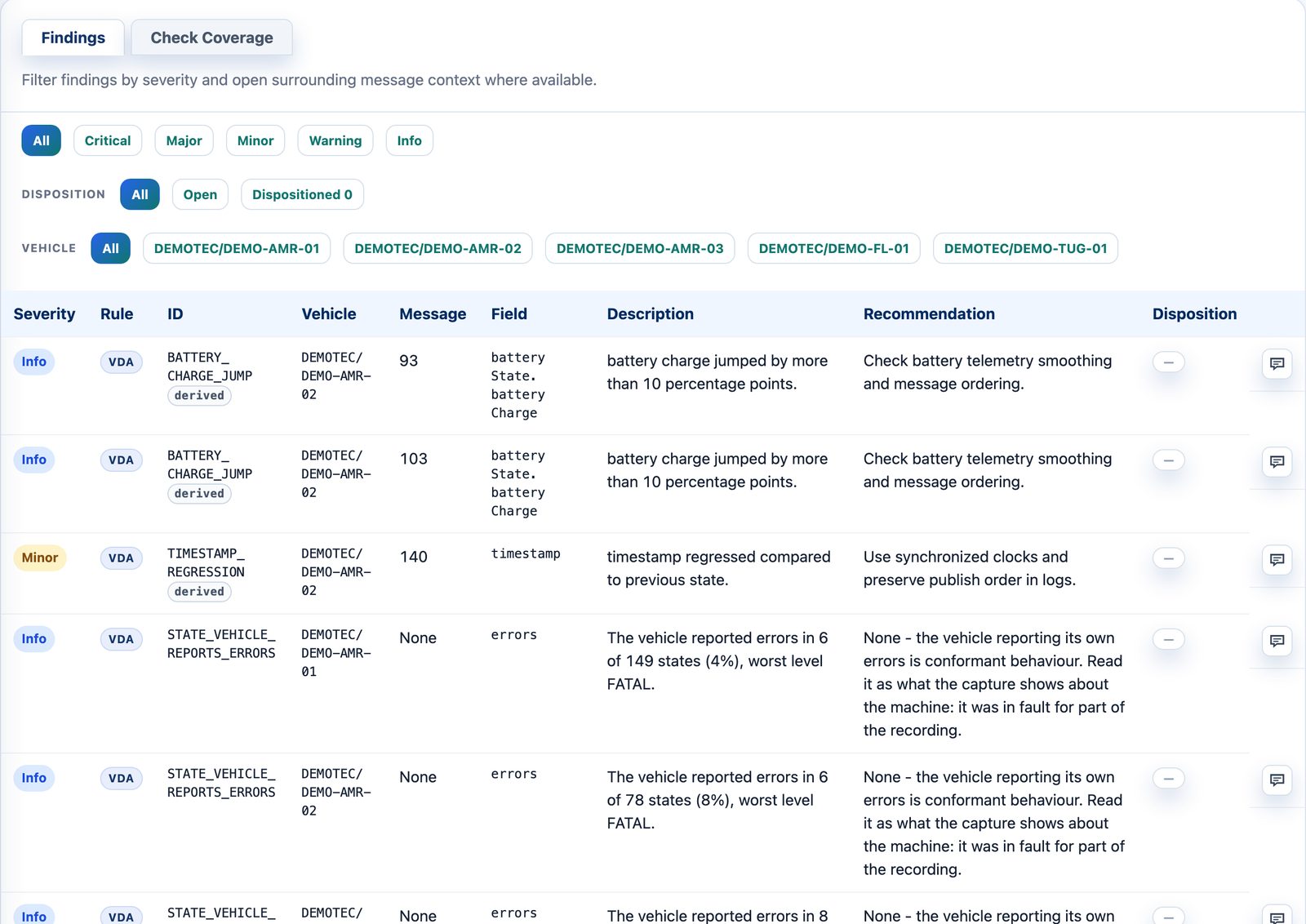
The findings of a report: severity, the family each rule comes from, the vehicle, the field path and the clause of the version being judged, with the disposition recorded beside it.
Findings with severity, vehicle, field path, clause and disposition.

From a finding to the message

Each finding opens the message that triggered it with the offending field highlighted. The previous and the next message are shown beside it, so a deviation is read in context. Filters work by severity and by vehicle. Grouping works by check or by message.

Acceptance usually ends with a list. The report records it: each finding can carry a disposition (accepted deviation, false positive, to fix) with a mandatory justification and its author. Re-runs inherit earlier decisions and two runs can be compared check by check. Dispositions never change a verdict.

Result
A traceable list for the acceptance meeting.
Decision
What must be fixed before go-live and what is accepted in writing.
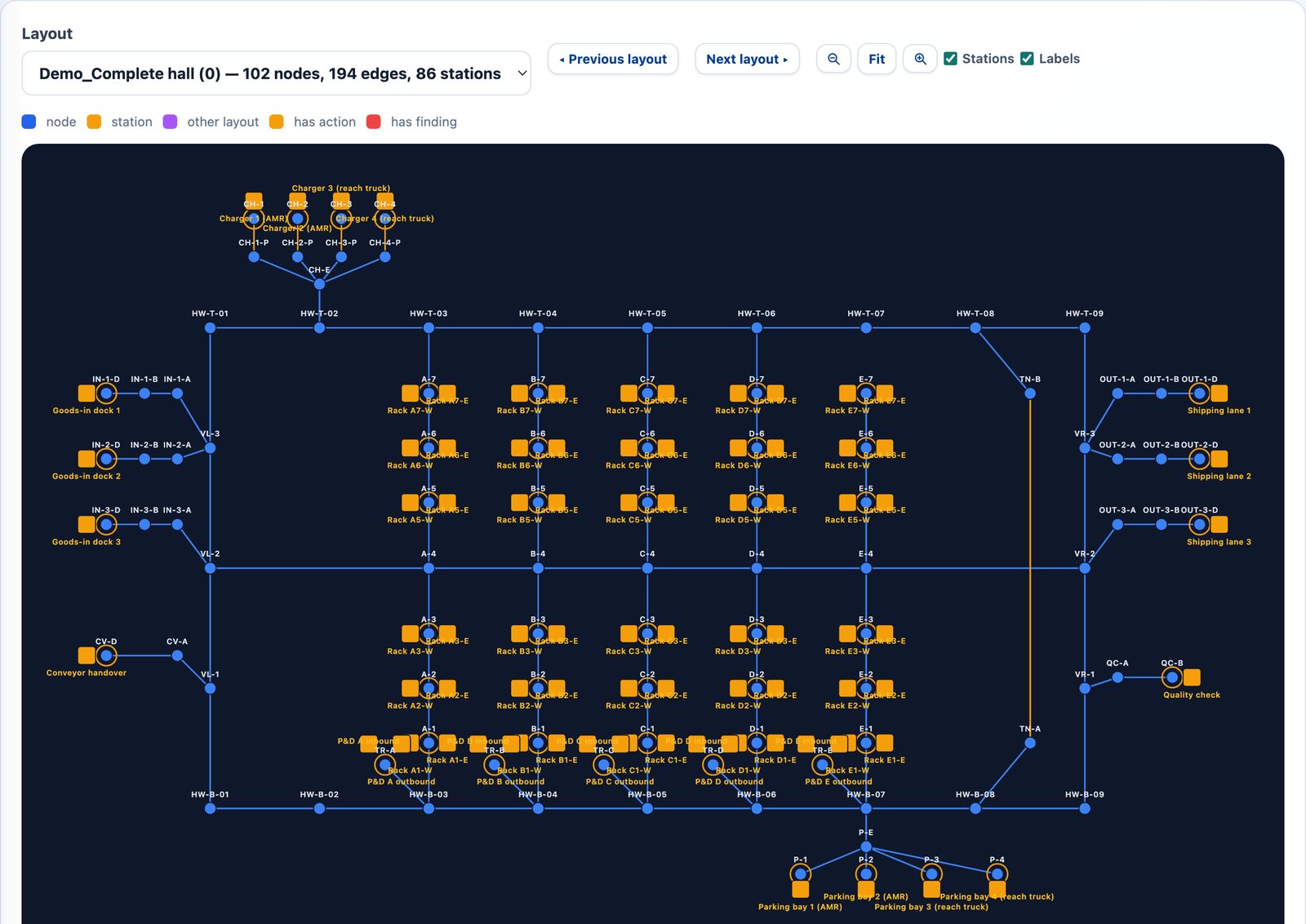
The track layout of a LIF file drawn from its real coordinates: nodes, stations and edges, with names that step aside where they would overlap.
A LIF layout drawn from its coordinates. Elements with findings are marked in red.

Factsheet, layout and site rules

Factsheet. 24 checks compare the traffic with what the vehicle declares in its factsheet: actions outside its catalogue, parameters it never claimed to support, orders beyond its declared limits, state messages outside its declared interval. Because both sides are judged against the same document, these findings say whether the fleet controller or the vehicle is responsible. Without a factsheet the group reports no data and never a pass.

Layout. A LIF file is checked for schema, duplicate ids, dangling edges and isolated nodes and drawn as a map. Orders are compared node by node and edge by edge with that layout. On a mismatch every missing node is named. Layout findings also name the responsible side.

Site rules. Integration guides contain rules the standard does not know, such as a required format for a bin id. A custom ruleset carries them as declarative JSON into the same analysis. Custom findings are marked and reported in a second verdict, so the VDA5050 verdict stays unchanged.

Technical details: signed packages, audit data, ruleset limits

A report exports as one package: the report, the analysed file, the cleaned messages and every reference, with a manifest of SHA-256 hashes. On the instances LogistiXpert operates the manifest carries an Ed25519 signature. Anyone can check a package against our public key. A dedicated installation exports the hashes without a signature. Each run records its inputs: project, log file, layout, factsheets, message counts by type, every vehicle by name, target version, schema revisions, an input checksum and the time.

Custom rulesets are interpreted by seven fixed rule types and never executed as code. A copy of each ruleset used is frozen with the report together with its name, version and SHA-256. Up to 200 checks and 2 MB per file. Uploading is reserved for superusers and administrators. The developer guide describes the format.

3 · Testbench

Tests that run the same way every time

The Analyzer reads traffic that already happened. The Testbench produces it: it acts as the fleet controller, sends VDA5050 orders and records how a vehicle answers. That makes a test repeatable, on a real vehicle over a real broker or on a vehicle twin with no hardware connected.

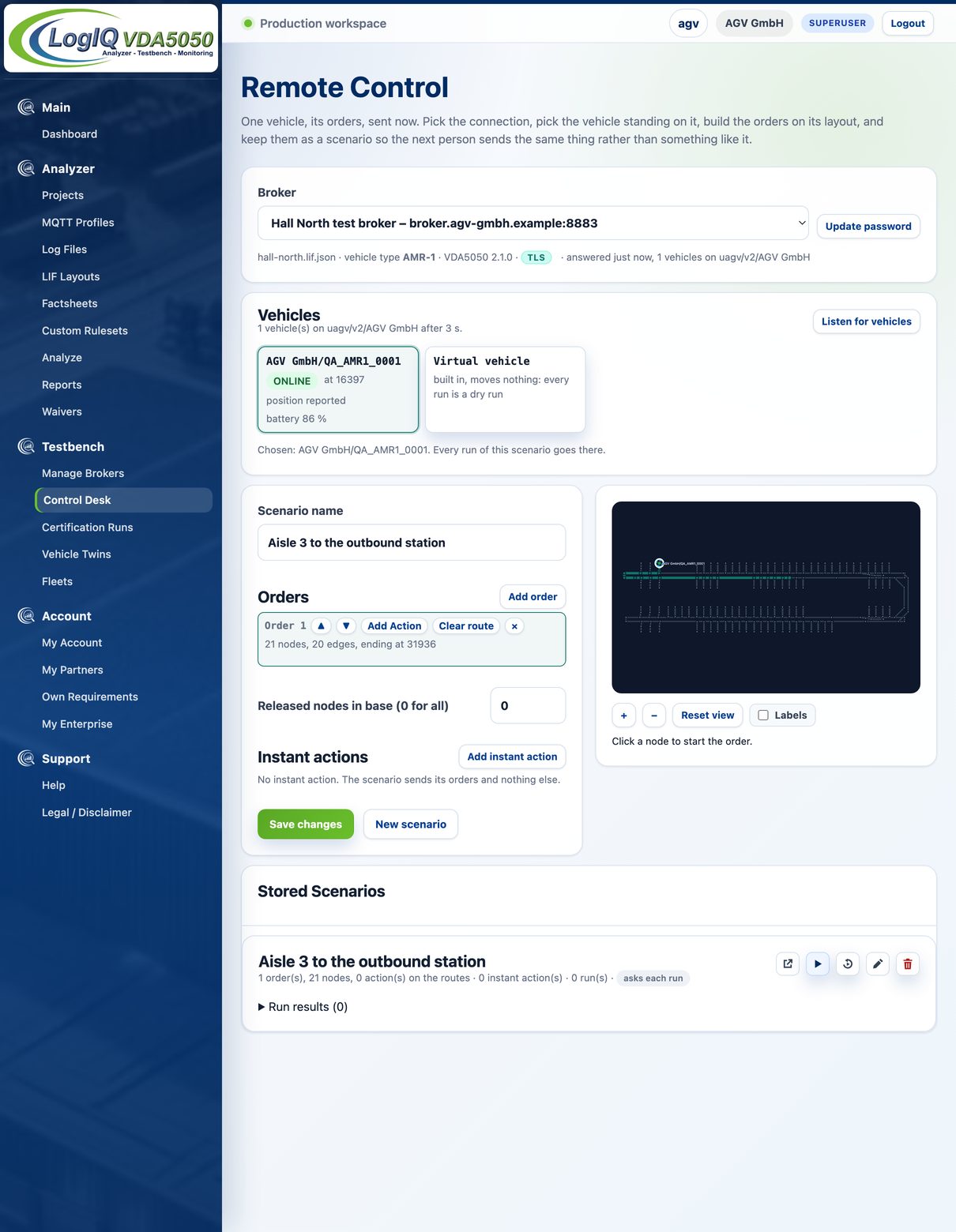
The control desk with a connection chosen: the broker and its layout, the order editor with the map beside it and the instant actions.
The control desk: an order is built on the layout of the chosen connection.

Control desk: one order, sent now

A connection is stored once with broker address, credentials, layout, vehicle type and VDA5050 version. On the control desk you build an order by clicking a route on that layout or send an instant action, then watch what comes back. Where a factsheet is known, the editor only offers actions the vehicle declares.

Input
Broker connection, LIF layout, optionally the vehicle's factsheet.
Result
The vehicle's answer to a specific order, recorded and checked like any other traffic.
Decision
Whether the vehicle can do this at all, before a longer run is planned around it.
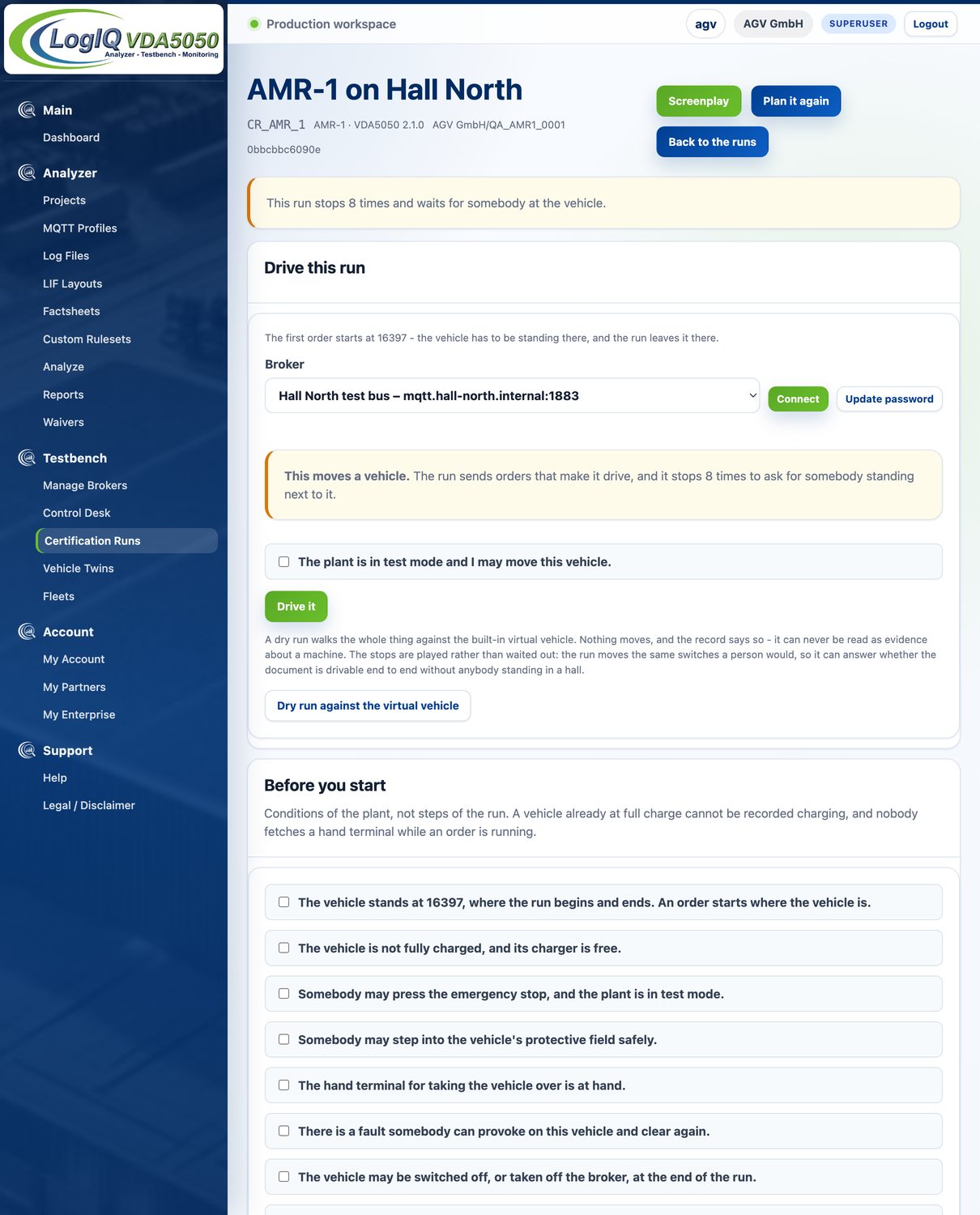
A planned test run before it is driven: the stops at which it waits for somebody at the vehicle, the broker it will be driven over, the confirmation that the plant is in test mode and the conditions the plant has to meet before anything is sent.
A planned test run before it starts: stops, broker, test-mode confirmation and plant conditions.

Planned test runs: fixed before the first order

A planned run is an ordered list of segments built from your layout and your vehicle. It deliberately provokes the situations coverage asks for: it holds a horizon back and releases it, cancels a running order and requests a factsheet. Two situations cannot be sent by any fleet controller: an emergency stop is pressed by a person and a fault has to be provoked and cleared. The run stops there, says who is needed and continues only when the traffic shows it happened.

The orders are fixed before anything is sent, so the run itself does not change between attempts. Each attempt gets its own record. The traffic the Testbench sends is judged by the same rules as the vehicle's.

Terminology. The application calls these runs certification runs. They produce evidence for a protocol check or a customer acceptance. They are not an official certification.

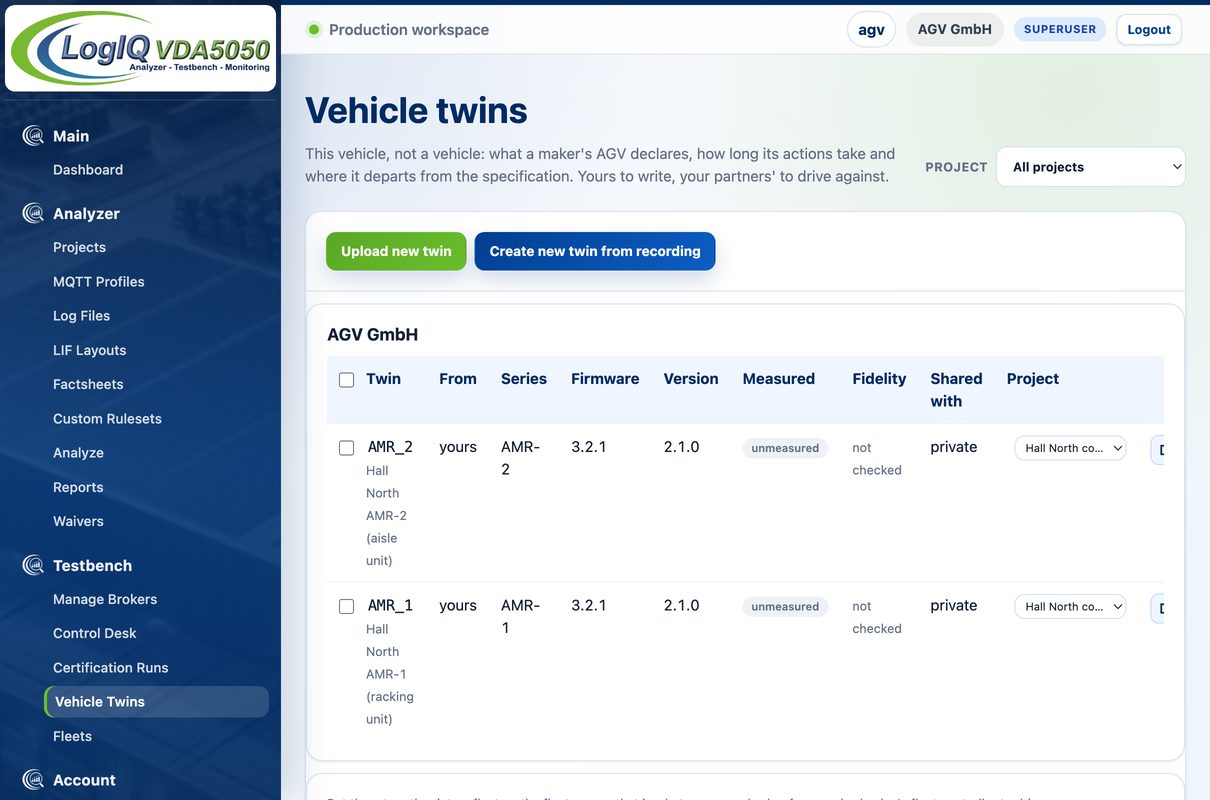
The vehicle twins page: each twin with its vendor, series and firmware, whether it was measured or declared and the fidelity it reached against the recording it came from.
Vehicle twins with their origin (measured or declared) and fidelity.

Vehicle twins: measured from a recording

A vehicle twin is a behaviour model of one real vehicle: travel speed, dwell time at a node, the states it reports on the way. It is measured from a recording of that vehicle or uploaded as a twin document. A measured twin can be checked: a short plan is driven against it and compared with the original recording. The result is one percentage with the figures behind it. Readings that could not be compared are named.

Decision
Whether a twin is close enough to the real vehicle to test a fleet controller against it.
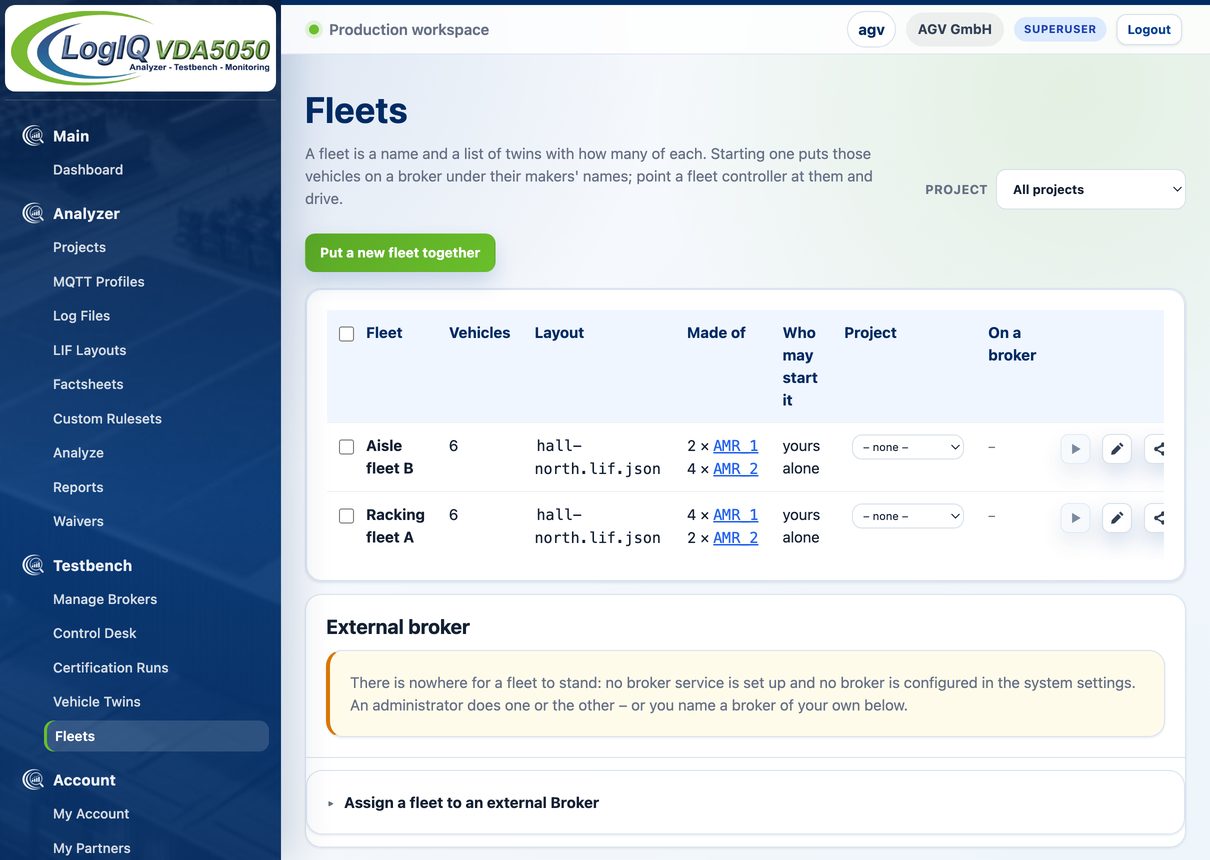
The fleets page: each fleet with its layout, the twins it holds and how many of each.
Fleets of twins, each with its layout and the number of vehicles per twin.

Fleets: vehicles on a broker for your own fleet controller

A fleet is a list of twins with a count for each. Starting it puts those vehicles on a broker under their manufacturers' names. A fleet-controller vendor connects its own software and drives them. LogIQ sends no orders to them; the twins only answer.

Where the broker service is configured, each fleet gets a broker of its own, which is released a quarter of an hour after the last connection closes. Starting a fleet also starts a capture of it, so the session is recorded without a separate step. A fleet starts complete or not at all.

4 · Monitoring

The same checks on a site that is running

Monitoring applies the Analyzer to a fleet in operation. It reads the traffic the vehicles already publish. No additional sensors are installed and nothing is requested from the vehicle manufacturer.

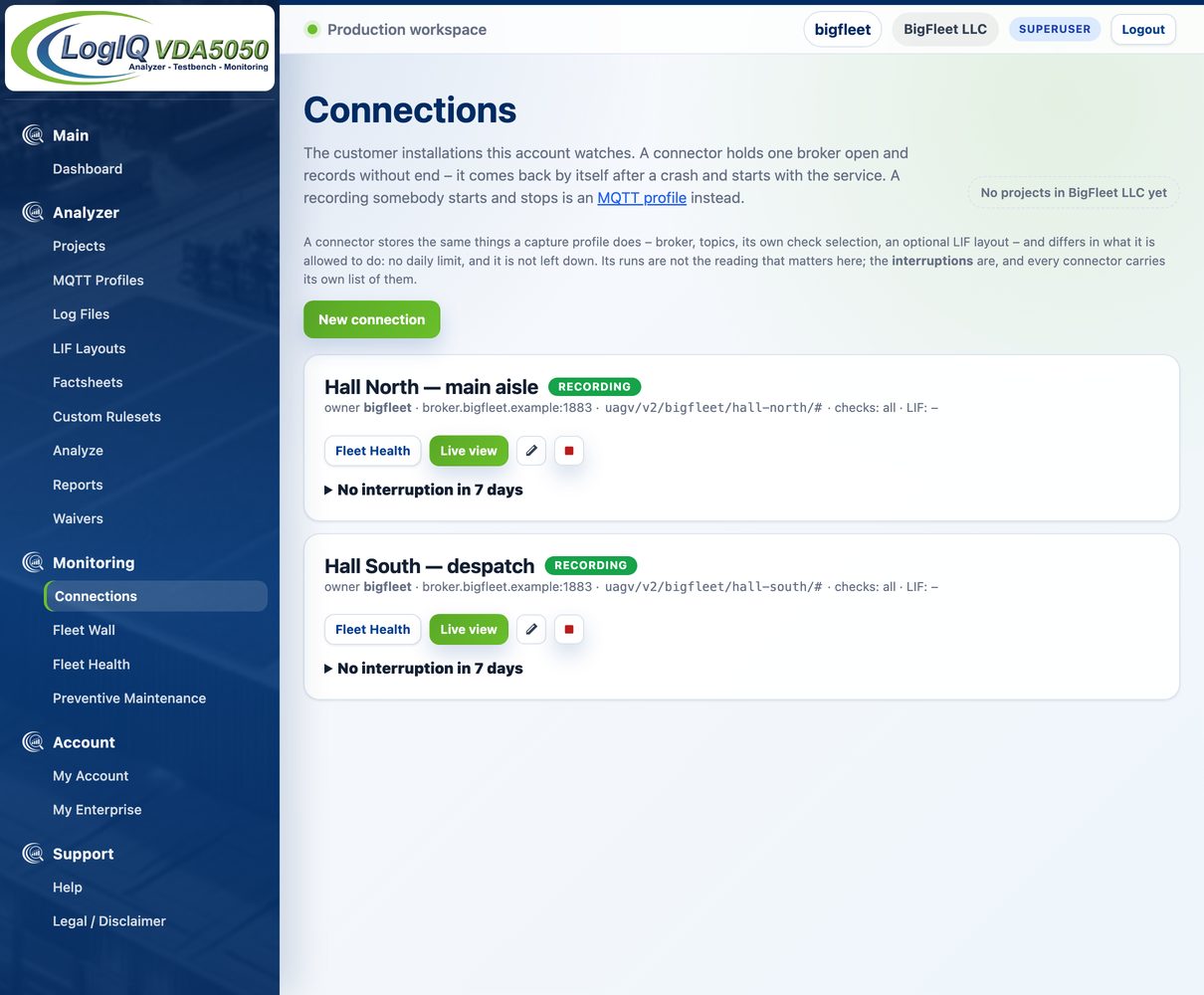
The connections page: two connectors on one installation, each with its fleet health link, its vehicles and the interruptions in the last seven days.
Two connectors on one installation with their vehicles and interruptions of the last seven days.

Connectors: recording without an end

A connector stores what a capture profile stores: broker, topics, check selection and optionally a layout. Unlike a capture profile it has no daily limit, reconnects by itself after an interruption and starts with the service. The page lists every gap in the recording with its duration. A recording stopped by hand counts as a new recording, not as an interruption.

A capture can also mirror everything it records onto a second broker as it arrives. The mirror runs in one direction and only while LogIQ is running.

Input
Read access to the site's MQTT broker, directly or through a reverse tunnel.
Result
A continuous, checked recording of the fleet.
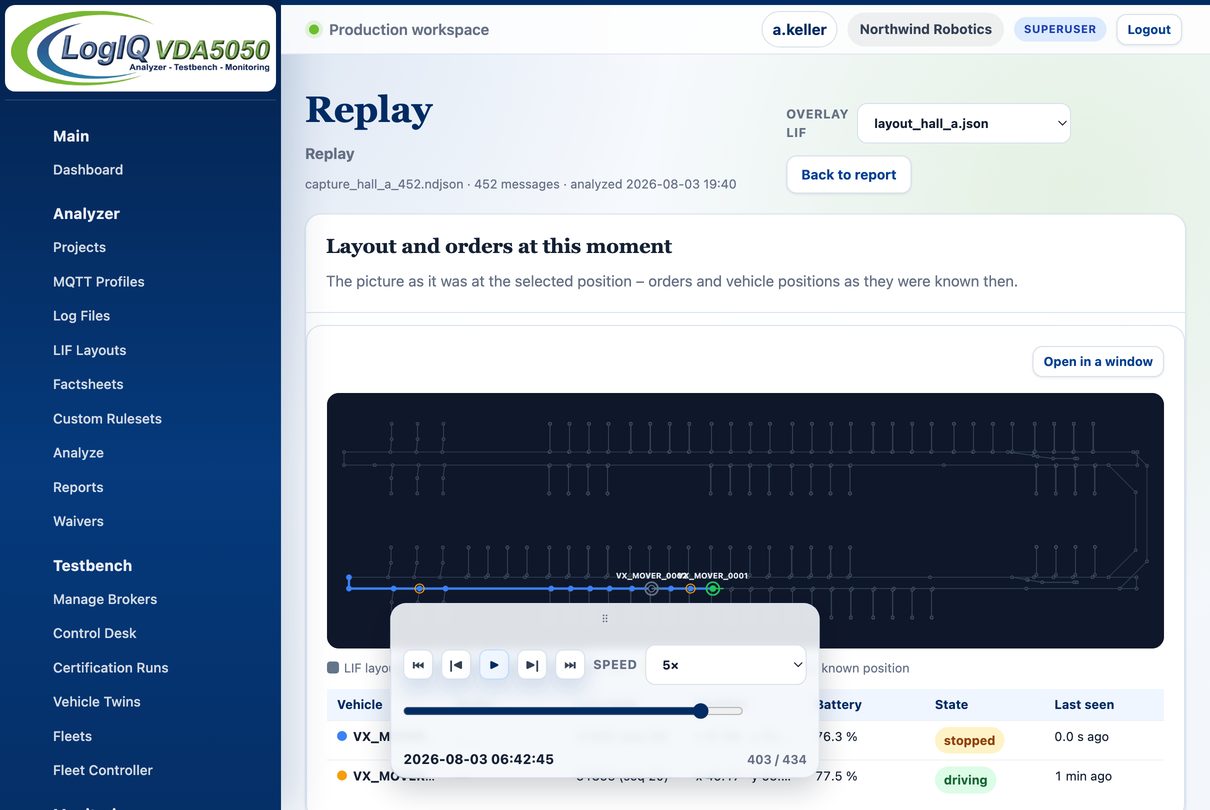
A finished capture replayed on the imported LIF layout: the route of the active order highlighted on the track, with the vehicle table and the transport controls below it.
Replay of a finished capture on the LIF layout with the active order highlighted.

Live view, replay, digests and alerts

The live view shows every vehicle on the layout with its last order and its last reported position. Where map and vehicle disagree, the view names the contradiction. Replay plays a finished capture or an imported log at up to 20× speed and steps back and forth one message at a time. It shows only what was known at each point in time.

Nobody reads a weekend of messages. Digests summarise at a set interval what stood out, by severity, vehicle and check. A quiet period is reported too, so silence is not ambiguous. Alerts go out once a set number of findings is reached, optionally only for the higher severities. The fleet wall shows every connector as one picture on one screen.

Decision
Which fleet needs attention now. Whether an incident needs a vendor or can be handled internally.
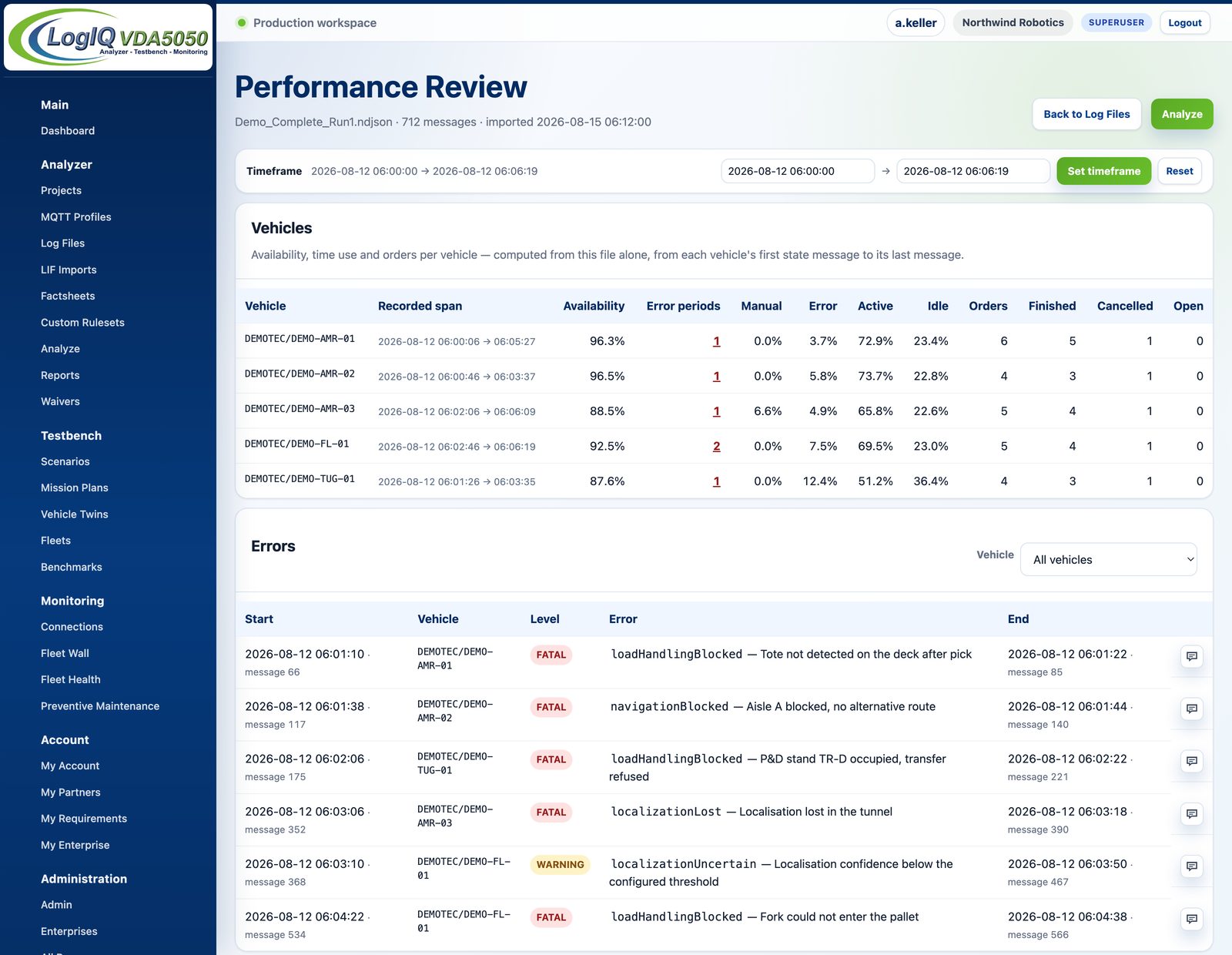
The performance review of one shift: a row per vehicle with availability, error periods and the shares of manual, fault, active and idle time, followed by the error periods themselves with their start and end.
One shift, five vehicles: shares of the recorded time per vehicle and every error period in one list.

Performance review: what the fleet did with its time

Every imported log and every finished capture carries a performance review. Each vehicle is in exactly one of manual, fault, active, idle or other at any moment, so the shares add up to the recorded time. Active means an order is still open, not that the vehicle is driving. A warning the vehicle keeps working through does not count against availability; only errors above warning level do.

The time window can be narrowed to a shift or to the half hour before a standstill. Below the table every error period is listed with level, type, the first and the last message that reported it.

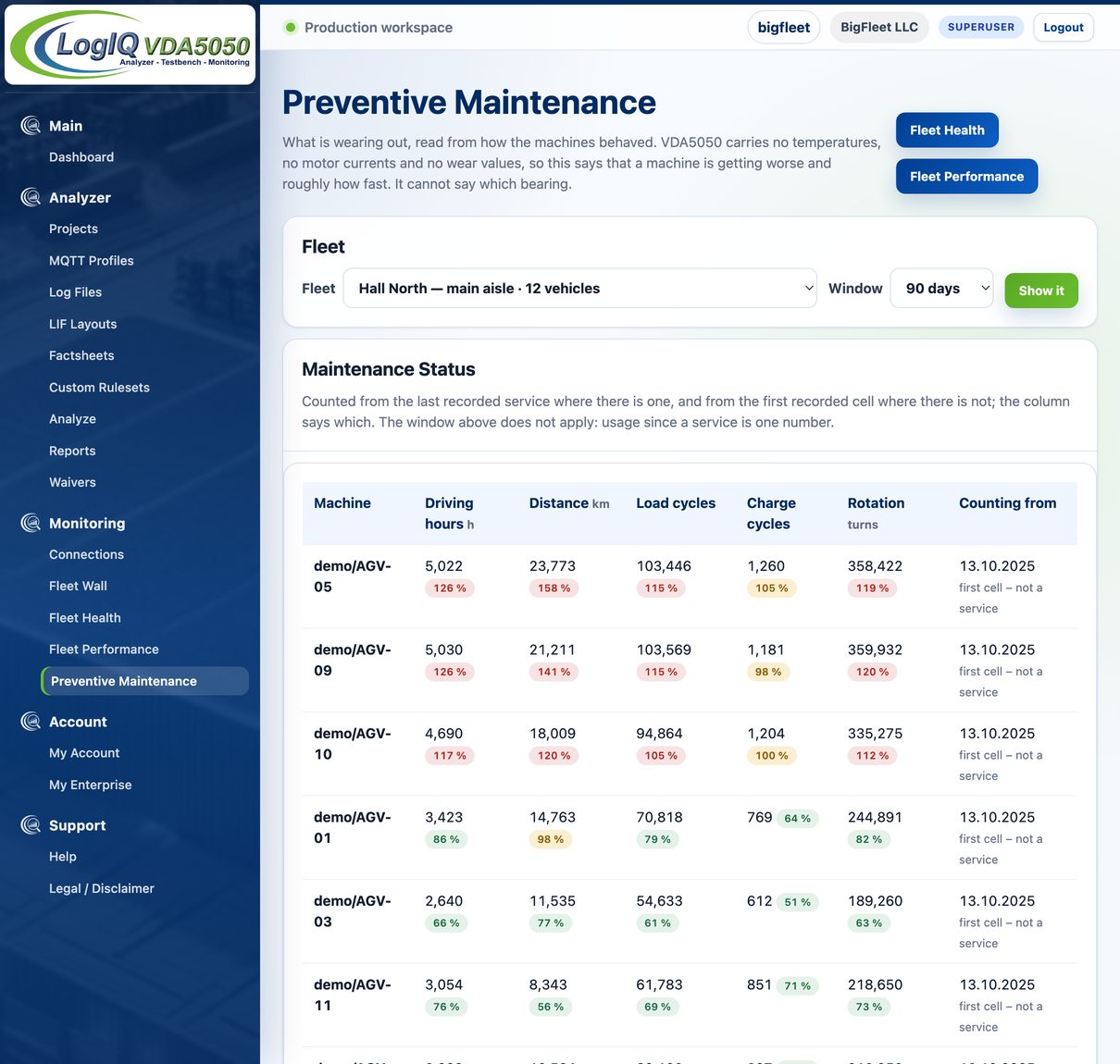
Preventive maintenance: driving hours, distance, load cycles, charge cycles and rotation per vehicle, each against the fleet. Each counter shows the date it counts from.
Usage counters per vehicle since the last recorded service, compared with the fleet.

Fleet health and maintenance: measured, derived, indicated

Measured Counted directly from the traffic: driving hours, distance, load cycles, charge cycles, error periods, protective-field violations and emergency stops per vehicle. A service is not visible in VDA5050 traffic, so it is entered by hand and the counters run from it.

Derived Calculated from measured values: mean time between failures and to recovery, the most frequent error types, the fastest traversal of each edge per week and the voltage drop between standstill and driving where the vehicle reports battery voltage.

Indication A trend is flagged when the latest quarter of a vehicle's daily values departs clearly from its own earlier values, for example a rising voltage drop under load, more manual interventions per hour or slower traversals on a clear route. It is a reason to look, not a forecast of a failure.

Limits. VDA5050 carries no temperatures, motor currents or wear values. These figures are operating statistics, not condition monitoring. A field a vehicle never sends is shown as not sent, never as zero.

5 · Operation and reference

Runs where the data has to stay

Recordings from a live installation rarely leave the company network. LogIQ VDA5050 runs hosted by us or as a dedicated installation.

  • Two editions

    Hosted is our instance at logiq-vda5050.com. Dedicated is a sealed image with a licence file, brought up with Docker Compose on your hardware or on a server we build for you.

  • Encrypted connection

    MQTT over TLS, with your own CA certificate where the site uses one. Broker passwords are stored encrypted.

  • A licence file that does not call home

    A dedicated installation checks its signed licence file locally. After expiry there are 14 days of grace, then read-only access. Recorded data is never locked away.

  • Roles, teams and projects

    Member, superuser and administrator rights are enforced in one place. Logs, layouts and reports are filed under projects. Plans limit people, projects and profiles, not the amount of traffic analysed.

  • Links that cannot be guessed

    Reports and runs sit behind unguessable ids with an ownership check on every access.

  • Automated tests on every change

    More than 3,500 automated tests run on every change to the code.

System integrators

Accept third-party systems on the basis of recorded traffic. A weekend recording gives a report with findings that lead to the message and field a supplier call needs.

Test houses and consultancies

A documented, repeatable scope instead of home-grown scripts, with several customers side by side. Reports under your own name are an option on Unlimited.

Procurement and tender teams

State in the invitation what a bid has to demonstrate, as a requirement file. Every bidder is measured against it the same way.

5 · Operation and reference

Common questions

What is LogIQ VDA5050?

An independent platform for AGV and AMR fleet communication. It reads VDA5050, VDMA M2X and VDMA LIF messages from a log file or live over MQTT, drives reproducible test runs and monitors fleets in operation. Every result is backed by an auditable report.

Which standards does it check and how many checks are there?

VDA5050, VDMA M2X and VDMA LIF, with 265 checks: 234 for VDA5050 in its four versions, 16 for M2X and 15 for LIF layouts.

Is a passed report a certification?

No. A report shows which checks ran against which recording and what they found. It is evidence for a protocol check or a customer acceptance. LogIQ VDA5050 issues no certification and no release approval. A vendor badge is the vendor's own mark.

Can I run it on my own hardware?

Yes. The dedicated edition ships as a sealed Docker image with a licence file and runs in your own network, on your hardware or on a server we build for you. The other edition is hosted at logiq-vda5050.com.

Are the reports verifiable?

Every run states which checks ran, which did not apply and why. Report packages from the instances we operate are signed. Anyone can verify one against the public key at logistixpert.com/verify.

Is it tied to a particular vehicle or fleet-controller vendor?

No. LogistiXpert is independent, with no vendor ties and no stake in the outcome. The point is neutral evidence both sides can trust.

Resources

Downloads and references

Get started

Three ways to start

01

Demonstration

A walk-through on demo data: one clean and one faulty data set with a matching layout.

02

Pilot on your data

One recording from your installation, analysed and discussed together.

03

Operation

Hosted at logiq-vda5050.com or a dedicated installation in your own network.

LogIQ VDA5050 provides diagnostic guidance. It issues no certification and no release approval. VDA 5050 is a specification of the VDA; LIF and M2X are specifications of the VDMA. The designations are used here to say what this tool reads. This is an independent tool, not affiliated with or endorsed by either body. See the imprint.